19 Nov
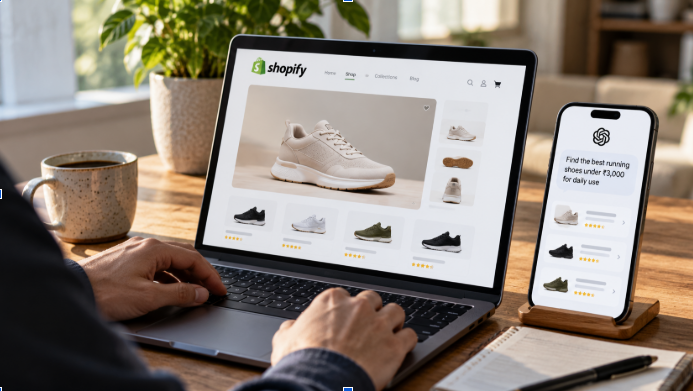
Imagine a customer asking an AI assistant to recommend the best running shoes under ₹3,000. Instead of visiting several websites, the customer receives product recommendations based on price, features and personal requirements.
Now imagine your Shopify product appearing in those recommendations.
This is the idea behind agentic commerce, where AI-powered tools help customers discover products, compare options and make purchasing decisions. For online store owners, this creates another opportunity to reach potential buyers.
However, having a Shopify store does not automatically mean AI shopping assistants will recommend your products. Your product information must be accurate, clear and accessible through the relevant shopping channels.
This is where Shopify AI storefront SEO becomes important. It helps you prepare your store for changing shopping habits while maintaining your traditional SEO strategy.
What Is Shopify AI Storefront SEO?
Shopify AI storefront SEO is the process of improving your product pages, technical setup and product data so AI-powered shopping experiences can better understand and discover your products.
Traditional SEO focuses on helping search engines understand and rank website pages. AI shopping optimisation also considers how shopping assistants interpret detailed customer requests and identify suitable products.
For example, someone searching for wireless headphones might ask an AI assistant for headphones with good battery life, a clear microphone and a price below ₹5,000.
Your product page should clearly explain these features so customers can understand whether the product meets their needs.
Shopify supports agentic storefronts that can make eligible products available through supported AI shopping channels. Availability and purchasing options depend on the platform and store eligibility.
How Do AI Shopping Agents Discover Shopify Products?
AI shopping agents can use product catalogues, structured product information, feeds and information available through web crawling or indexing. The exact process depends on the platform.
Typically, they need to understand the customer’s request, find relevant products and compare available information before presenting recommendations.
For example, when someone searches for sunscreen suitable for everyday use, useful product details may include SPF, ingredients, skin type suitability, price and application instructions.
If your product page contains incomplete descriptions or unclear specifications, it may be harder for customers and shopping systems to evaluate your product.
Therefore, accurate product information is one of the most practical starting points for Shopify agentic commerce SEO.
How to Optimise Shopify Product Pages for AI Shopping Agents
1. Write Clear Product Titles and Descriptions
Your product title should explain what you are selling without making customers guess.
For example, instead of using a title such as “Ultra Bright LED Kit”, use a more descriptive title like “9005 LED Headlight Bulbs, 6000K Cool White, Pair”.
The second title gives customers a better understanding of the product.
Product descriptions should also answer common questions. Explain what the product does, who it is suitable for, its important features and how to use it.
Avoid repeating keywords unnecessarily. Write naturally and include details that genuinely help customers make decisions.
2. Add Complete Product Specifications
Customers often compare products before buying. Missing specifications can make this process difficult.
Depending on your product category, include relevant information such as:
- Size, dimensions, materials and colour
- Ingredients and usage instructions
- Technical specifications and compatibility
- Warranty and package contents
- Available variants and stock status
For example, an electronics store should clearly explain compatibility and power requirements. A clothing store should provide accurate sizing information.
The aim is to make product information complete enough for customers to compare options confidently.
3. Optimise Product Images and Variants
Use clear images that show the actual product from different angles. Add meaningful alt text that describes what the image contains instead of using generic filenames.
Also, check that every product variant has the correct price, image and availability. If you sell a product in multiple sizes or colours, use clear variant names rather than internal codes.
These improvements help customers understand exactly what they are purchasing.
4. Check Product Structured Data
Structured data helps search engines interpret information such as product names, prices, availability and variants.
Shopify themes and apps may already generate Product structured data, so check your existing setup before adding more code.
Use Google’s Rich Results Test to identify supported structured data issues. Make sure the information in your markup matches what customers see on the product page.
Structured data does not guarantee AI recommendations, but valid markup can help eligible search systems understand your product information.
5. Keep Product Feeds Updated
Product feeds share product information with shopping platforms. Shopify merchants may use Google Merchant Center and the Google and YouTube sales channel, while Shopify Catalog supports product discovery through eligible AI shopping channels.
Review your feeds regularly to ensure prices, images, stock status and product variants are accurate.
If your product page displays one price but your connected feed contains another, it can create confusion and affect product eligibility.
Technical SEO Checklist for Shopify AI Storefronts
Good product content is important, but your website must also be accessible and technically sound.
Check Crawler Access and Indexing
Review your robots.txt instructions before blocking search engine or AI-related crawlers. Restricting access can affect discovery through public web pages, depending on the crawler and platform.
Check Google Search Console for indexing problems, broken links, incorrect canonical tags and important product pages that are not indexed.
Shopify also provides agent discovery resources, including /agents.md, /llms.txt and /llms-full.txt. Review Shopify’s current documentation to understand their availability and purpose.
Improve Website Speed and Mobile Usability
Many customers shop using mobile phones, so make sure your product pages load properly and are easy to navigate.
Optimise large images, remove unnecessary scripts and keep important product details easy to find.
A fast website does not guarantee AI visibility, but it creates a better experience for customers who visit your store.
Keep Store Policies Clear
Publish clear shipping, refund, return and cancellation policies. Explain delivery expectations and provide accessible customer support information.
These details help customers understand how your business operates and make purchasing decisions with greater confidence.
A Practical 30-Day Shopify AI SEO Plan
You can start improving your store without changing everything at once.
Week 1: Audit your store. Check product feeds, indexing issues, agentic storefront settings and incomplete product information.
Week 2: Improve important product pages. Update titles, descriptions, images, specifications and variants for your top 10 to 20 products.
Week 3: Review technical SEO. Check structured data, canonical tags, robots.txt, mobile usability and store policies.
Week 4: Measure the results. Use Google Search Console, Shopify analytics and available AI channel reporting to review product visibility, traffic and sales.
Continue improving your store based on the issues you find. Results can vary, and better product information does not guarantee a particular recommendation or ranking.
Conclusion
Shopify AI storefront SEO is becoming a useful consideration for ecommerce businesses as customers explore new ways to discover and compare products.
The best starting point is not to fill your website with AI-related keywords. Instead, focus on accurate product descriptions, complete specifications, reliable product feeds and a technically accessible store.
Continue investing in traditional SEO while reviewing the AI shopping channels available to your business.
By making your products easier to understand and compare, you can build a stronger foundation for product discovery and a better shopping experience.
Frequently Asked Questions
Q1. What is Shopify AI storefront SEO?
Answer:
Shopify AI storefront SEO involves improving product information, website accessibility and store content so AI-powered shopping experiences can better understand and discover your products.
Q2. How can I optimise my Shopify store for AI shopping agents?
Answer:
Write clear product titles and descriptions, add complete specifications, optimise images and variants, validate structured data and keep product feeds accurate. Also, review your technical SEO and available AI shopping channel settings.
Q3. Do I need an AI SEO app for Shopify?
Answer:
No, not necessarily. Start by reviewing Shopify’s existing features, your product feeds and your technical SEO. Consider an additional app only when it solves a specific problem that your current setup cannot address.
Q4. Does Shopify AI storefront SEO guarantee product recommendations?
Answer:
No. Better product information can support discovery, but AI shopping platforms use their own systems to select and rank products. Recommendations depend on the customer’s request, product eligibility and other platform-specific factors.
Artzen is a performance-driven agency specializing in ecommerce SEO services in India. Backed by years of industry experience and a team of certified, highly skilled SEO specialists, we implement strategies with precision and measurable growth. We prioritize our clients at every stage, delivering results that exceed customer expectations.